
Key takeaways:
- Immutable backups are an important part of ransomware resilience: Backups written to WORM (write once, read many) storage are protected against modification or deletion for a defined retention period when correctly configured.
- Immutability is part of a cybersecurity strategy, rather than an isolated feature: Recognised in security guidance and industry frameworks, immutable backups can support recovery after ransomware, reduce insider risks and help meet retention requirements.
- Veeam supports several immutability options: These include hardened Linux repositories, object storage with S3 Object Lock, tape/WORM storage and Veeam Data Cloud Vault, depending on the architecture and configuration.
- Block retention and recovery depend on correct configuration: The immutability period needs careful planning. A short period may leave insufficient recovery history, while a long period increases storage requirements. Veeam's block-generation and retention behaviour must also be considered.
- Immutable backups still need tools such as SureBackup for testing: Protected backups must still be checked and tested in isolated recovery environments. Combining immutability with validation helps identify damaged backup chains and assess whether restore points are usable.
Secure backup is an essential part of a modern organisation's protection. Many teams nevertheless find implementation challenging, particularly when integrating backup with a wider cybersecurity strategy against malicious threats.
A 2025 ransomware trends and proactive strategies report stated that attackers had targeted backup repositories at 89% of the surveyed organisations. More organisations are therefore incorporating immutable backup into their security policies and operational practices.
What exactly is an immutable backup, and why might an organisation use this technology?
What is an immutable backup?
An immutable backup protects stored backup data against modification or deletion for a defined period. Correctly configured write protection helps preserve recovery copies against tampering, accidental changes and ransomware. Recoverability still depends on backup integrity, configuration and testing.
The U.S. Cybersecurity and Infrastructure Security Agency (CISA) recommends resilient backup practices as part of ransomware protection. In its ransomware guidance, CISA recommends maintaining offline, encrypted copies of critical data and regularly testing restoration. Offline storage, encryption and immutability are complementary controls, but an offline encrypted copy is not automatically immutable. Different storage protection approaches are discussed below.
Why are immutable backups important?
Immutable backups can help protect important records, including personal information, and support trust in essential services. In sectors such as drinking-water infrastructure, preserving reliable recovery copies can support operational resilience and system integrity. This is why GORI selected Veeam Data Cloud Vault as a managed storage solution for protecting essential data and supporting the water services it provides.
Ransomware is not the only reason to protect backups. Immutability also helps reduce the risk of losing recovery copies through accidental modification or deletion.
A government organisation attracted public attention after deleting a large number of files affecting people outside the agency. An investigation found that usable backups were unavailable because files had expired or been removed during a cleanup operation. The incident caused substantial negative publicity and employment consequences.
Other organisations have experienced similar accidental or malicious data losses without the incidents becoming widely publicised.
Effective backup and retention planning requires clear service-level agreements (SLAs), helping stakeholders balance storage costs, recovery history and the availability of critical information.
Immutable versus traditional, modifiable backups
| Feature / Consideration | Traditional, modifiable backups | Immutable backups |
| Data protection | Backups can be modified or deleted or encrypted after a compromise or configuration error. | Write-once, read-many (WORM) protection prevents modification or deletion during the configured retention period. |
| Ransomware protection | Potentially vulnerable: malware may encrypt or destroy accessible backups. | Stronger protection against unauthorised modification or deletion when correctly configured; it does not remove every ransomware or insider risk. |
| Integrity and compliance | Integrity depends on access controls and protective measures. | Protected retention can support record integrity and compliance processes, but does not establish regulatory compliance by itself. |
| Storage cost and efficiency | Often less costly; redundant data is easier to delete or overwrite. | Retention rules can increase storage requirements while helping reduce exposure to expensive downtime and loss of recovery copies. |
| Flexibility and control | Backups can generally be updated, deleted or truncated whenever policy and permissions allow. | Requires careful retention planning; policy defines the immutability window. |
| Recovery Time Objectives (RTO) | Fast restoration is possible if data is intact; reliability depends on the backup's condition. | Restoration can be similarly fast, but immutability alone does not prove that a backup is clean or usable. Recovery testing remains necessary. |
| Implementation options | Broad support in on-premises and cloud environments. | Options include supported object-lock or immutable-blob storage, hardened repositories and protected snapshots, depending on the backup platform and configuration. |
| Typical use cases | Non-critical copies, development and test environments, or cost-sensitive archives. | Critical systems, protected retention and improved resilience against ransomware. |
How can you extend an existing backup investment with immutability? Veeam offers several technologies and architectures that can form part of a protected backup strategy.
Immutable and traditional backups can coexist. Protected copies may hold important recovery history while modifiable copies serve other retention requirements or less critical datasets.
Organisations can use Veeam's 3-2-1-1-0 backup rule as a planning framework.
- Three copies of the data
- On two different media types
- One copy off-site
- One copy offline, air-gapped or immutable
- Zero errors confirmed through recovery verification, for example with SureBackup
Benefits of immutable backups
Beyond ransomware resilience, protected backup copies can provide the following benefits:
- Data integrity and security
- Reducing unwanted changes : immutable storage helps preserve a backup after it has been written, although it cannot correct pre-existing corruption.
- Protection against cyberattacks : correctly configured immutable retention helps prevent ransomware or malicious users from modifying or deleting protected backup objects.
- Supporting data protection requirements (HIPAA, SEC rules, GDPR and others .)
- Regulatory obligations may require protective measures that
backup retention can support. Immutability is one possible control rather than an automatic compliance guarantee. Data
integrity and protection against unauthorised changes can be supported by
tamper-resistant records and auditable logs, alongside appropriate governance and other safeguards.
- Regulatory obligations may require protective measures that
- Reliable disaster recovery
- Faster recovery times : verified, usable backup copies allow teams to restore systems and information after an incident.
- Recovery point objectives : a protected backup system can retain more recovery points safely, while backup frequency and retention policy determine the potential loss window.
- Preserving historical data
- Supporting auditability and compliance : protected archives can support audits and retention requirements when configured within an appropriate policy and governance framework.
- Supporting forensic investigation: preserved backup data can provide evidence for incident analysis when provenance, access and handling are documented.
- Protection against insider threats and human error : the strategy helps protect retained copies against accidental deletion and unauthorised modification.
- Reducing financial exposure : although immutability can increase storage needs, it may reduce the impact of ransomware, downtime and loss of recovery copies.
Want to see these benefits in practice? Public- and private-sector organisations use Veeam to improve backup resilience. Explore how businesses use Veeam solutions as part of their wider data protection strategy.
Implementing immutable backups
Implementation depends on the storage technology selected. Regardless of technology, the strategy should consider the following:
- Use the 3-2-1-1-0 framework to plan resilient, verifiable backup copies.
- Select storage that supports the required write-once, read-many or immutable-retention controls.
- Use supported immutable snapshots and retention locks.
- Apply role-based access and separation of duties to limit who can change backup configuration or remove unprotected copies.
- Maintain off-site copies and plan deletion safeguards.
- Automate integrity checks and alerts. Regularly test recovery and monitor unexpected deletions or abnormal file activity.
- Test retention controls in an isolated test environment by attempting authorised changes to disposable test data.
Veeam developed Veeam Data Cloud Vault — a managed cloud storage service integrated with Veeam Data Platform, intended to simplify infrastructure management and storage-cost planning. Using Microsoft Azure, Veeam Vault provides preconfigured immutable cloud storage with isolation controls, and encryption as part of its data protection approach.
In addition, Veeam works with a range of immutable-storage partners to offer several storage options. A typical backup architecture shows where immutability and encryption can help improve resilience.
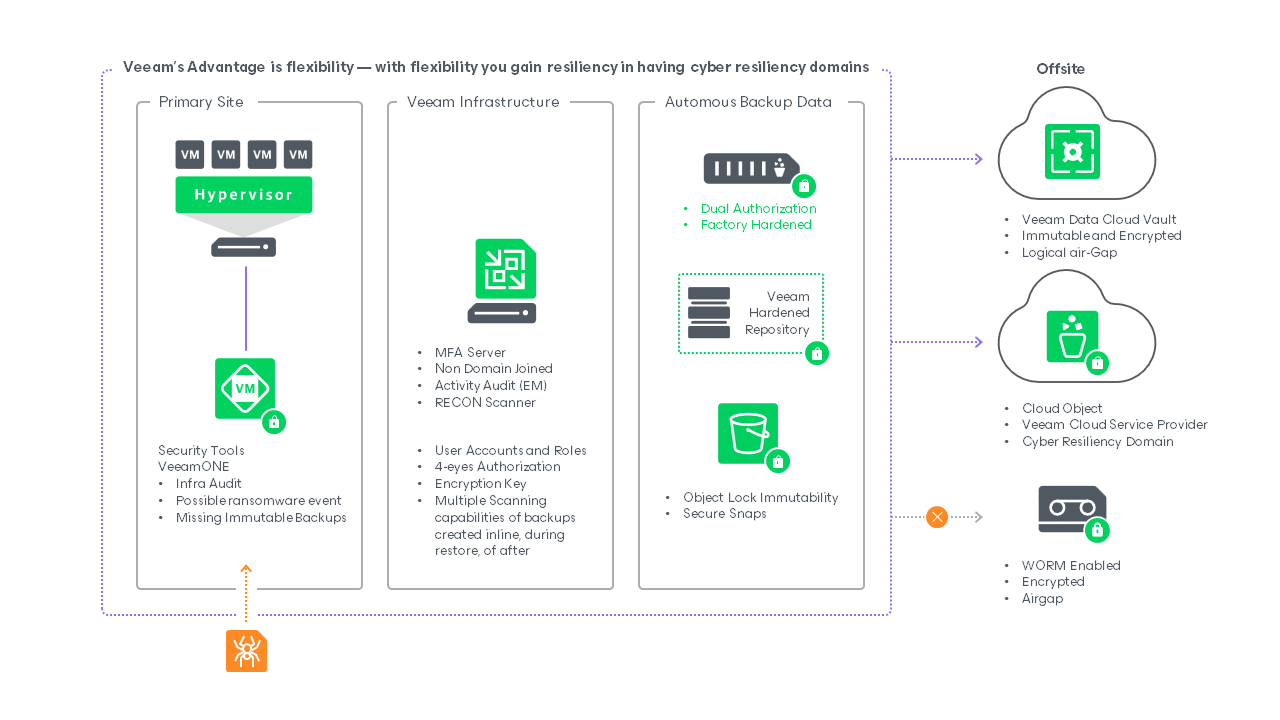
The original dataset resides in production infrastructure. At this layer, primary storage systems may provide protected, read-only snapshots of workloads. These can support fast recovery after a recent data-loss event. Veeam supports backup and restoration from supported storage snapshots to help meet RPO and RTO objectives.
Next comes the Veeam backup infrastructure with appropriate access controls. These can include multifactor authentication and separation from backup storage. If production data is compromised, changed or lost, a protected backup copy can provide a recovery source, subject to its integrity and usability.
Finally, there can be an isolated recovery or cleanroom environment containing backup data, with different storage options using Veeam backup portability and supported immutability features. The following sections examine these options.
How can immutable backups be implemented with Veeam?
| Choose the immutable storage type | — Hardened Linux repository: an on-premises option using Linux filesystem immutability and single-use deployment credentials, with supported XFS configurations. — Object storage: supported S3-compatible services such as AWS, Wasabi or IBM Cloud with Object Lock; or Azure Blob with its own supported immutability controls. — Managed cloud storage: preconfigured, protected storage supplied through Veeam's managed service. |
| Configure storage for immutability | For a Linux repository: — Prepare the Linux host, supported filesystem and secure management access according to the product documentation. For object storage: — Enable the appropriate supported retention controls, such as Object Lock and versioning or Azure immutable-blob policies. — Create a bucket or container with the required supported settings. |
| Add storage to Veeam Backup & Replication | — Open the Veeam Backup & Replication console. — Open Backup Infrastructure > Backup Repositories > Add Repository. — Select the supported hardened Linux repository option, or the appropriate object-storage type for a cloud destination. — Enable supported immutability controls and configure a retention period appropriate to the platform and backup policy. |
| Configure backup and backup-copy jobs | Use supported backup-copy or storage-tier workflows with immutable destinations. — Linux repositories: direct suitable backup or copy jobs to the hardened repository. — Object storage: configure a supported workflow that writes protected backup copies to the cloud repository. |
| Validate and test immutability | After running a test backup: — Linux: inspect the supported lock metadata and filesystem attributes. Object storage: review retention settings in the storage console. — In an isolated test environment, verify that retention prevents deletion of disposable protected test data. — Use supported Veeam tools and PowerShell commands to test recovery scenarios. |
| Monitoring and maintenance | — Review the relationship between backup retention, immutability windows and the complete backup chain. — Check logs, repository settings and storage-object metadata. — Maintain supported Veeam and storage-system versions and security updates. |
Technology and infrastructure
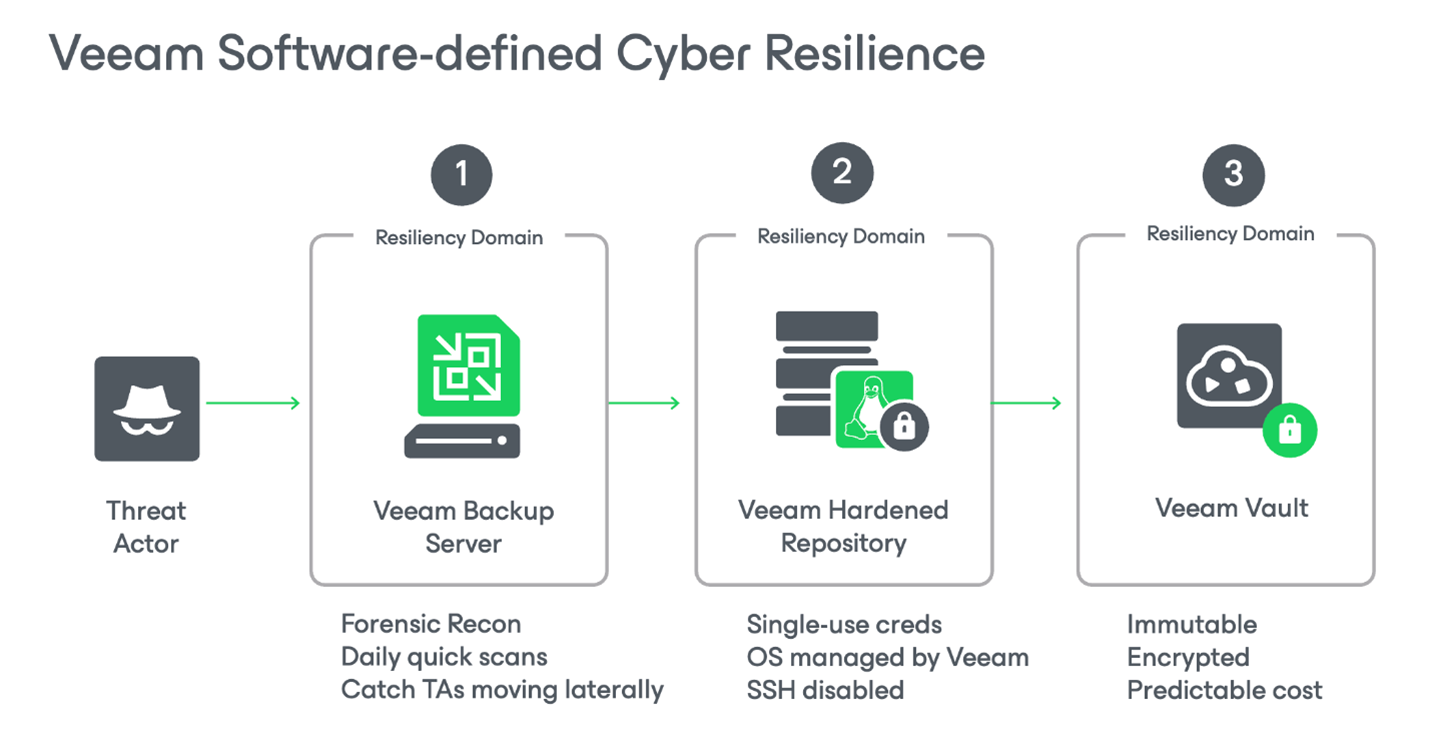
Immutable cloud options include:
Veeam Data Cloud Vault provides managed immutable, encrypted storage with logical isolation from production. This can suit organisations seeking to reduce additional hardware and administration. Retention defaults and available controls should be checked for the selected service offering.
Public providers including AWS and Microsoft Azure offer supported retention protection for Amazon S3 buckets or Azure containers, respectively.
Other providers, including Backblaze, Wasabi and 11:11 Systems, offer supported S3-compatible storage options for Veeam backups.
Ecosystem providers, including IBM and Veeam Cloud & Service Providers (VCSPs), can supply protected storage and disaster-recovery services. Supported replication options may also help meet recovery-time objectives for important workloads.
On-premises immutable storage options include:
A wide range of Veeam Ready – Repository partner products supports relevant Veeam backup features, depending on the storage architecture and certified integration.
The following are examples of these approaches:
Veeam Hardened Repository : Veeam's native hardened-repository approach stores protected backups on supported disk-based servers. Hardware can come from HPE, Cisco, Dell, Lenovo and other manufacturers.
On-premises S3-compatible storage : supported products can provide Object Lock and integrate with Veeam backup workflows. Vendors include Object First, Cloudian, DataCore, Dell, ExaGrid, Fujitsu, Scality, IBM, MinIO, Hitachi and Spectra Logic BlackPearl and others.
Deduplication appliances : disk-based systems that include deduplication and compression. In particular, HPE StoreOnce provides ISV-DI integration with dual authorisation. Other vendors, including ExaGrid, Quantum and Infinidat, use different retention-lock or protected-snapshot mechanisms, depending on the product.
Pure Storage FlashBlade//S : This on-premises S3-compatible provider also offers Object Lock and a SafeMode retention lock as an additional control against insider risks or compromised administrative credentials.
Backup technology considerations
The vendors listed above provide knowledge-base articles describing supported designs and operational practices. Some retention settings are difficult or impossible to shorten once applied. Understand business SLAs and storage implications before setting the policy.
Consider the following questions when selecting an approach for your organisation.
- Timescale: How quickly must operations be restored: within a day, a week, a month, or another defined period? Prepare more than one recovery route. Relying on a single snapshot mechanism leaves gaps and shared risks. A separate, protected backup copy can improve recovery options.
- Process: which recovery tasks are manual or automated, and in what order should they run? An outage is not the time to decide which workloads to restore first. Keep business-continuity and disaster-recovery procedures documented, tested and current. Supported orchestration tools can assist.
- Where: Location: will recovery take place in a cloud, at a service provider or at a second data centre? Consider off-site replication and geographical separation when planning business continuity and disaster recovery. If a second site is unavailable, evaluate suitable VCSP or public-cloud options for protected off-site copies.
Frequently asked questions:
- What exactly is an immutable backup?
A backup protected from modification or deletion during a defined retention period, commonly through WORM controls. It helps preserve existing recovery copies against tampering and accidental or malicious deletion.
- Why are immutable backups increasingly important?
Ransomware and insider risks make it important to retain copies that cannot readily be changed or deleted. Immutability supports this aim, but a usable, clean backup still requires integrity checks and recovery testing.
- How does Veeam implement immutable backups?
Veeam supports several architectures, depending on product version and storage compatibility:
— Object storage, such as AWS S3 or Wasabi with supported Object Lock, and Azure Blob with its supported immutability controls.
— Hardened Linux repositories using filesystem-level protection.
— Supported appliances, WORM storage and managed cloud storage.
- What is the immutability period, and why does it matter?
It is the time for which backup data remains protected from modification or deletion. Backup-chain dependencies can extend actual retention. Policy changes do not necessarily permit deletion before protected retention expires.
- Can data older than the protection period, or data already deleted, be restored?
Only if the required data and metadata still exist in retained recovery points, versions or other copies. Supported object-storage recovery tools cannot recreate data that has been permanently removed. Procedures depend on the exact storage architecture.
- Can immutability extend normal retention?
Yes. Protected data can remain after ordinary job retention would otherwise remove it. Plan for the full backup chain and storage overhead rather than assuming each restore point expires independently.
- What are the minimum and maximum immutability periods?
Supported limits depend on the repository type and product version. Consult the documentation for the chosen implementation and set a period that meets the recovery and retention policy.
- How can immutability be tested?
Use an isolated test environment and disposable test backups. Verify that retention blocks unauthorised changes, then test an actual restore. Do not use production recovery copies for destructive testing.
Source: veeam.com